
Need For Speede Joystick1.8 - App Store
You'll be able to see results in few seconds.
Publisher Description
New update coming soon!
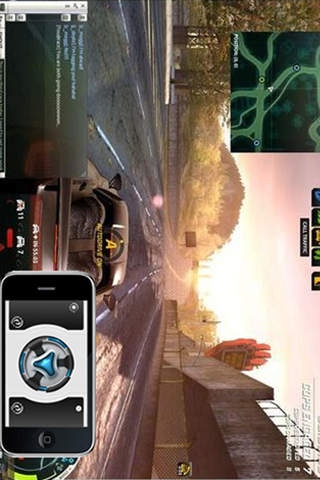
Turn your iPhone or iPod into a wireless Joystick ,fully functional mouse,keyboard,play the game "Need For Speed" .
Tested:
Need for speed 6
Need for speed 9
Need for speed 12
Not just a remote mouse,more function coming,
This app(new version) is able to control the car\helicopter models after you connect the transmitter to the audio jack of iPod touch or iPhone.
Features:
- Accelerometer based mouse controller
- Trackpad(full screen vertical and landscape modes)
- Ability to hide keyboard (shake to hide/show)
- Landscape keyboard (shake in landscape mode to show)
- Presentation mode with Pro option (Keynote/Powerpoint)
- Numeric keyboard
- Application notifications
- Remote keyboard with function and arrow keys
- Scroll pad
- Left and Right mouse buttons
- Modifier Keys
- On screen typing
- Custom sensitivity settings
- Supports Bonjour or static IP
- No screen size limitation. Works with multiple monitors.
- High resolution graphics for retina display on iPhone 4.
- And much, much more.
Requirements:
- Windows XP/Vista/Windows 7 (32/64bit)
- WIFI router (works best on a local area network or Ad hoc network)
- Server Software
** BEFORE YOU RUN THE SOFTWARE ** you will need to download the server application from :
http://www.microkernel.cn
** IMPORTANT ** IF YOU HAVE ANY PROBLEMS AT ALL, PLEASE CHECK THE TROUBLESHOOTING SECTION ON OUR SITE, THEN USE THE CONTACT FORM ON OUR SITE IF YOU ARE STILL HAVING PROBLEMS. We can not respond to reviews, so posting your questions there will not get you an answer. None of the reviewers saying that our app doesn't work ever contacted us for help. If you are unable to get the app to connect, contact us and WE WILL GET IT WORKING FOR YOU.
Visit our site for video and setup instructions.
Requires iOS 4.0 or later. Compatible with iPhone, iPad, and iPod touch.
About Need For Speede Joystick
The company that develops Need For Speede Joystick is hu yongchang. The latest version released by its developer is 1.8.
To install Need For Speede Joystick on your iOS device, just click the green Continue To App button above to start the installation process. The app is listed on our website since 2010-07-09 and was downloaded 0 times. We have already checked if the download link is safe, however for your own protection we recommend that you scan the downloaded app with your antivirus. Your antivirus may detect the Need For Speede Joystick as malware if the download link is broken.
How to install Need For Speede Joystick on your iOS device:
- Click on the Continue To App button on our website. This will redirect you to the App Store.
- Once the Need For Speede Joystick is shown in the iTunes listing of your iOS device, you can start its download and installation. Tap on the GET button to the right of the app to start downloading it.
- If you are not logged-in the iOS appstore app, you'll be prompted for your your Apple ID and/or password.
- After Need For Speede Joystick is downloaded, you'll see an INSTALL button to the right. Tap on it to start the actual installation of the iOS app.
- Once installation is finished you can tap on the OPEN button to start it. Its icon will also be added to your device home screen.
Program Details
System requirements
Download information
Pricing
Version History
version 1.8
posted on 2010-07-09
Disclaimer
Official App Store Link
We do not host Need For Speede Joystick on our servers. We did not scan it for viruses, adware, spyware or other type of malware. This app is hosted by Apple and passed their terms and conditions to be listed there. We recommend caution when installing it.
The App Store link for Need For Speede Joystick is provided to you by apps112.com without any warranties, representations or guarantees of any kind, so access it at your own risk.
If you have questions regarding this particular app contact the publisher directly. For questions about the functionalities of apps112.com contact us.
